Gallery

Projects

A selection of automations, integrations, and compliance systems I've designed, built, and shipped — across GoHighLevel, n8n, and A2P 10DLC.

A note on client privacy: The automations below were built for real clients and agencies, so I don't show their accounts, data or workflows without their authorization. Each case study is anonymized.

Case study

Email Marketing Membership Nurture Sequence for a Winery Client

The problem

A wine club needed to turn new leads (people who got a starter kit or filled in an insider form) into paying members. It had to happen automatically, without spamming anyone or sending the same person the same message twice.

What I built

A 7-day email and SMS sequence that tracks where each contact is and picks up from there.

  • Three ways in: an AI form submission, an insider sign-up form, or a manual “start” tag, so the team can enroll anyone themselves.
  • Duplicate check: contacts who already finished the sequence are skipped. Everyone else gets an opportunity created in the New Lead stage of the sales pipeline.
  • Picks up where they left off: if a contact had already started the sequence before, the workflow reads a custom field (“Next Message”) and jumps straight to their next message. New contacts start from the beginning.
  • The sequence (one step every 24 hours):
    • Email 1: Your kit + the $100 offer, plus an SMS
    • Email 2: The farm story
    • Email 3: What members say
    • SMS 2, plus Email: Meet the wines
    • Email: Pick your club
    • SMS 3: Any questions?, plus Email: Your questions, answered
    • Email: Last call
  • Tracking at every step: after each send, the workflow adds a progress tag and updates the “Next Message” and “Status” fields. At the end it adds a “Completed” tag.

Notable work

  • Can be stopped and restarted safely. Progress is saved on the contact, so if they leave and come back in, they never get the same message twice.
  • The team can see each lead’s progress at a glance from tags and custom fields.
  • Ties marketing to sales, because every new lead lands in the pipeline automatically.
  • Mixes email and SMS to get more people engaged.
Workflow Canvas ArchitectureFull Sequence Map
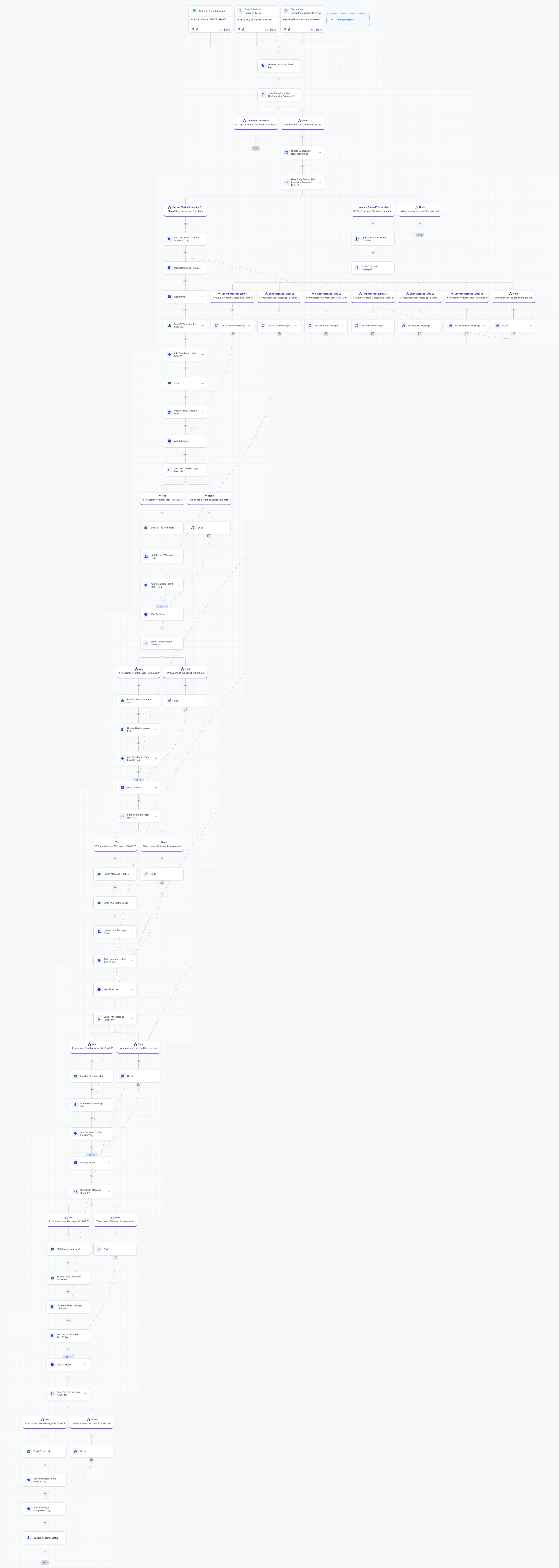
Email and SMS membership nurture sequence workflow diagram showing triggers, conditional branching, duplicate checks, and tracking tags
Scroll to explore the sequence branchesOpen full resolution →

Case study

In-Person Appointment Booking: Confirmations, Reminders & Lead Routing

Includes a webhook connected to n8n

The problem

When a prospect booked an in-person meeting, several things had to happen. The business owner needed to know right away. The prospect needed confirmation and reminders so they’d actually show up. The lead had to be tagged and placed in the right pipeline. All of this had to happen without anyone doing it by hand, and without repeating it when a meeting was only rescheduled.

What I built

  • Trigger: starts when an appointment’s status is confirmed, filtered to the in-person meeting type only.
  • Sends the booking to other systems: a webhook passes the appointment data to an external automation in n8n.
  • Reschedule check: if the appointment was a reschedule, the workflow stops, so nobody gets duplicate onboarding messages or duplicate pipeline entries.
  • Sets up the lead in the CRM: adds meeting notes to the contact, tags the lead source, and adds the contact to the Referral Network pipeline.
  • Instant confirmations:
    • The business owner gets an SMS and an email alert
    • The prospect gets a confirmation email
  • Reminders before the meeting, separate for each side:
    WhenBusiness ownerProspect
    24 hours beforeEmail + SMSEmail
    2 hours beforeEmail + SMS, plus a follow-up SMS with the meeting notes—
    1 hour before—Email
    15 minutes beforeSMS—

Notable work

  • Two audiences, two schedules. The business owner and the prospect each get reminders timed and worded for them, so each side gets only what’s useful to them.
  • Skips reschedules, which keeps the pipeline and inboxes free of duplicates.
  • Sends the meeting notes to the owner’s phone 2 hours before, so they walk in prepared.
  • Connects CRM to outside automation through a webhook, so the booking can feed other systems.
Workflow Canvas ArchitectureBooking & Reminder Sequence
In-person appointment booking workflow diagram showing triggers, n8n webhook, reschedule check, pipeline routing, and dual-track reminders
Scroll to explore the sequence branchesOpen full resolution →
Case study

Appointment Rescheduling: Reset Reminders & Keep the Pipeline Accurate

Includes a webhook connected to n8n

The problem

When a prospect rescheduled a meeting, the old reminders would still go out at the original time. That confused the prospect, notified the business owner at the wrong moment, and left the pipeline showing the wrong status. The fix had to work for both in-person and phone appointments, which use different reminder schedules.

What I built

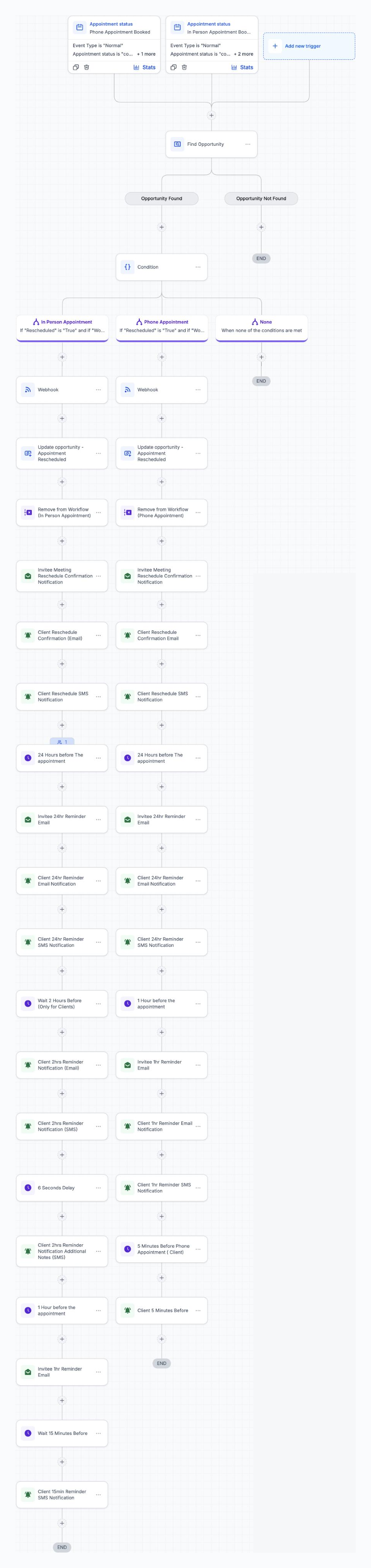
  • Two triggers: one for phone appointments and one for in-person appointments, both firing when an appointment is confirmed.
  • Only for real deals: the workflow looks up the contact’s opportunity and stops if there isn’t one, so stray calendar events are ignored.
  • Picks the right path: a condition checks that the appointment was actually rescheduled, then sends it down the In-Person or Phone branch.
  • On each branch:
    • A webhook sends the reschedule to n8n, where the rest of the process continues
    • The opportunity is moved to “Appointment Rescheduled” in the pipeline
    • The contact is removed from the original booking workflow, so the old reminders are cancelled
    • New confirmations go out: an email to the prospect, plus an email and SMS alert to the business owner
  • Reminders rebuilt around the new time:
    WhenIn-personPhone
    24 hours beforeProspect: email · Owner: email + SMSProspect: email · Owner: email + SMS
    2 hours beforeOwner: email + SMS + a follow-up SMS with the meeting notes—
    1 hour beforeProspect: emailProspect: email · Owner: email + SMS
    Right beforeOwner: SMS 15 minutes beforeOwner: alert 5 minutes before

Notable work

  • No outdated reminders. Removing the contact from the original workflow cancels every message tied to the old time, so nothing goes out on the wrong day.
  • One workflow handles both meeting types, each with its own reminder schedule.
  • The pipeline stays accurate on its own: rescheduled deals are visible to the sales team without anyone updating them.
  • Built as a pair with the booking workflow. The booking flow ignores reschedules and this one picks them up, so no contact is handled twice or missed.
Workflow Canvas ArchitectureRescheduling & Reminder Sequence
Appointment rescheduling workflow diagram showing phone and in-person triggers, opportunity verification, webhook to n8n, cancellation of old reminders, pipeline updates, and dynamic reminder branches
Scroll to explore the sequence branchesOpen full resolution →
Case study

Client Offboarding: Grace Periods & Automatic Account Deletion Dates

Includes a webhook connected to n8n

The problem

When a client cancelled, the team had to work out by hand when their GHL account should be deleted. Each client had a different grace period, and the grace period didn’t always start on the day they cancelled. Getting the date wrong meant either deleting an account too early or leaving it running (and costing money) long after the client had left. Clients also had to be taken out of every active campaign workflow so they stopped getting messages.

What I built

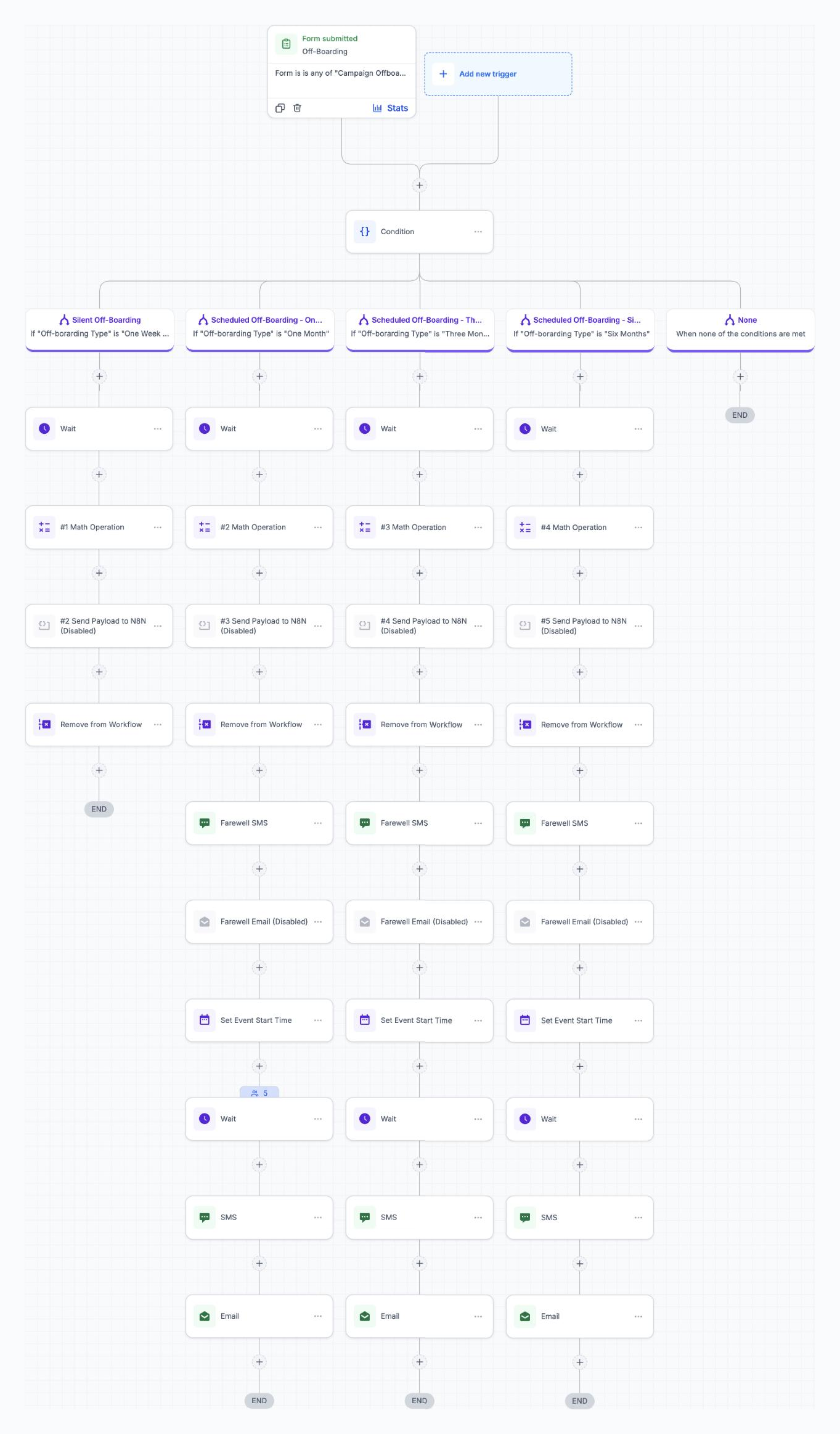
  • Trigger: the team fills in a campaign offboarding form, choosing the offboarding type and the date the grace period starts.
  • Routing by grace period:
    • Silent offboarding: a short exit with no client messages
    • Scheduled offboarding: one month, three months or six months
  • Each path:
    • Calculates the account deletion date automatically with a math operation: the start date the team chose, plus the grace period.

      Example: a client cancels today, the 30-day grace period starts Nov 23, so the deletion date is set to Dec 23.

    • Prepares a data handoff to n8n with the offboarding details, ready for other systems to use
    • Removes the contact from active workflows, which stops all campaign messages
  • Scheduled paths only:
    • Sends a farewell SMS when the client leaves
    • 7 days before the deletion date, sends a warning SMS and email telling the client their account will be closed and they’ll lose access. That gives them time to download their data, such as contacts and opportunities, before it’s deleted.

Notable work

  • No more working out dates by hand. The deletion date is calculated from a start date the team picks, not the cancellation date, so delayed starts and custom grace periods are handled correctly.
  • One form handles four offboarding scenarios.
  • Prevents expensive mistakes: accounts aren’t deleted too early, and no account keeps running long after the client has left.
  • Clients are warned before deletion. An automatic notice goes out 7 days before the account closes, so clients have time to export their contacts, opportunities and other data. It protects the client relationship, avoids “you deleted my data” disputes, and gives one last chance to win them back.
  • Exits are clean, with no stray campaign messages after cancellation.
Workflow Canvas ArchitectureOffboarding & Account Deletion Sequence
Client offboarding workflow diagram showing offboarding form triggers, conditional grace period branches, automatic deletion date math operations, n8n payloads, workflow removals, farewell SMS, and 7-day deletion warning alerts
Scroll to explore the sequence branchesOpen full resolution →
Case study

Automatic Client Success Manager Assignment & Onboarding Kickoff

Webhooks connected to n8n and ClickUp

The problem

Every new client on a 3- or 6-month plan had to be assigned to a Client Success Manager (CSM). Done by hand, that was slow and uneven: some CSMs got overloaded while others had room. After each assignment, the same setup steps had to be repeated in several places, including the pipeline, trackers and ClickUp.

What I built

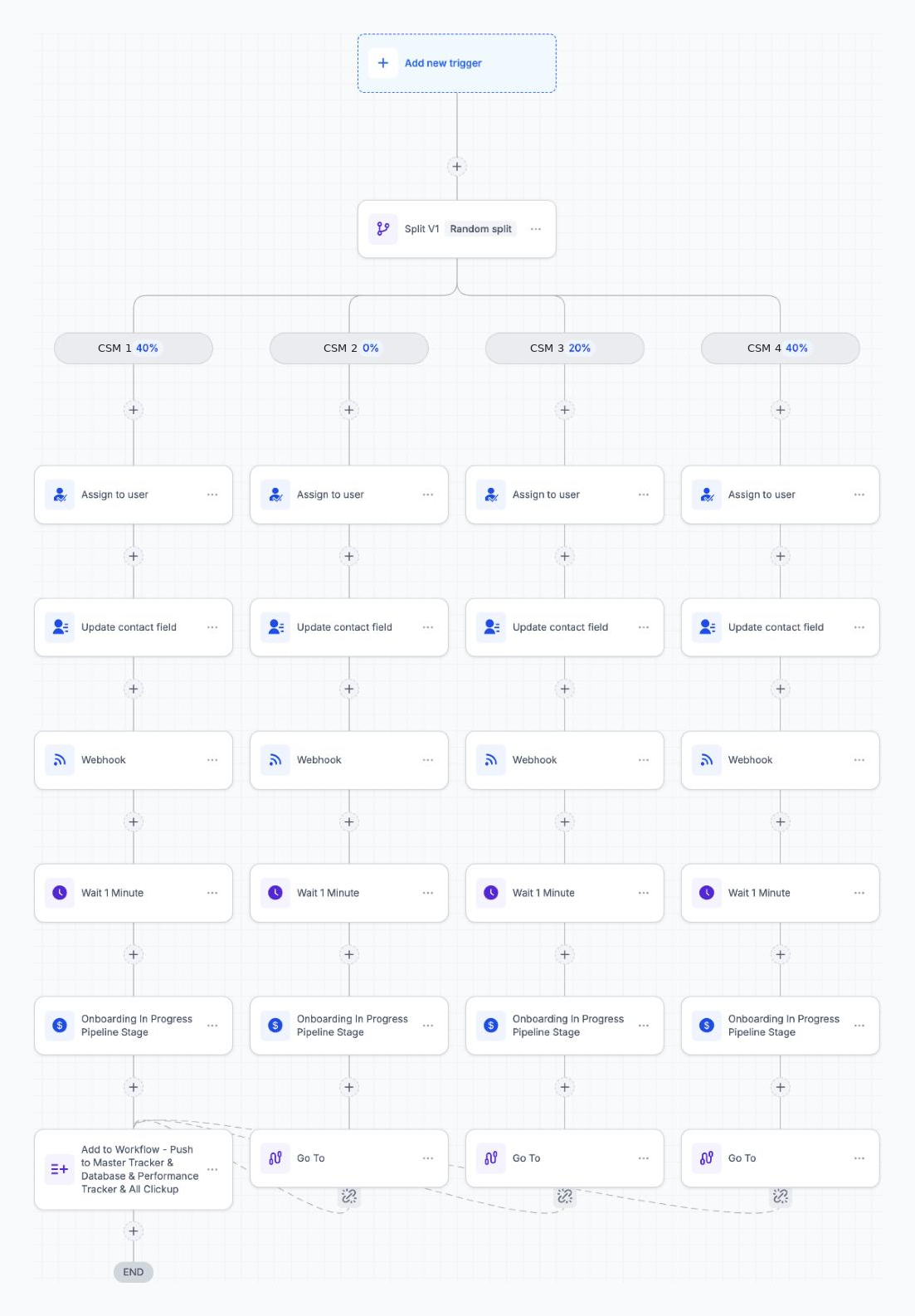
  • Started by other workflows: this runs as a sub-workflow that the sales and onboarding workflows hand new clients to, so the assignment logic lives in one place.
  • Weighted round-robin: a random split shares new clients among the CSM team by set percentages (for example 40% / 40% / 20%). Setting someone to 0% takes them out of the rotation, for vacations or a full workload, without touching anything else.
  • On each CSM’s path:
    • Assigns the contact to that CSM in the CRM
    • Updates a contact field with the assigned CSM, so other automations and reports can use it
    • Sends a webhook to n8n with the assignment, to notify the team or update other systems
    • Moves the client to the “Onboarding In Progress” pipeline stage
  • One shared ending: every path jumps to a single final step that adds the client to the workflow pushing their data to the Master Tracker, the database, the Performance Tracker and ClickUp.

Notable work

  • Fair, adjustable workload. Managers can rebalance the CSM team by changing a percentage, without rebuilding anything.
  • Built once, used everywhere. Other workflows hand clients to this one, so there’s a single place to update the assignment rules.
  • Avoids duplicate steps. All CSM paths share one ending, so the tracker and ClickUp setup is written once and kept consistent.
  • Connects several systems: CRM, n8n, a database, performance tracking and ClickUp, all from one assignment.

Results: Has assigned and onboarded 200+ clients, with the CSM assignment, pipeline update and tracker/ClickUp setup all done automatically.

Workflow Canvas ArchitectureWeighted Round-Robin & Onboarding Fan-Out
Automatic Client Success Manager assignment workflow diagram showing random split percentage allocation, user assignment, contact field update, n8n webhook, pipeline stage progression, and unified transition to master tracker and ClickUp sync
Scroll to explore the sequence branchesOpen full resolution →
Case study

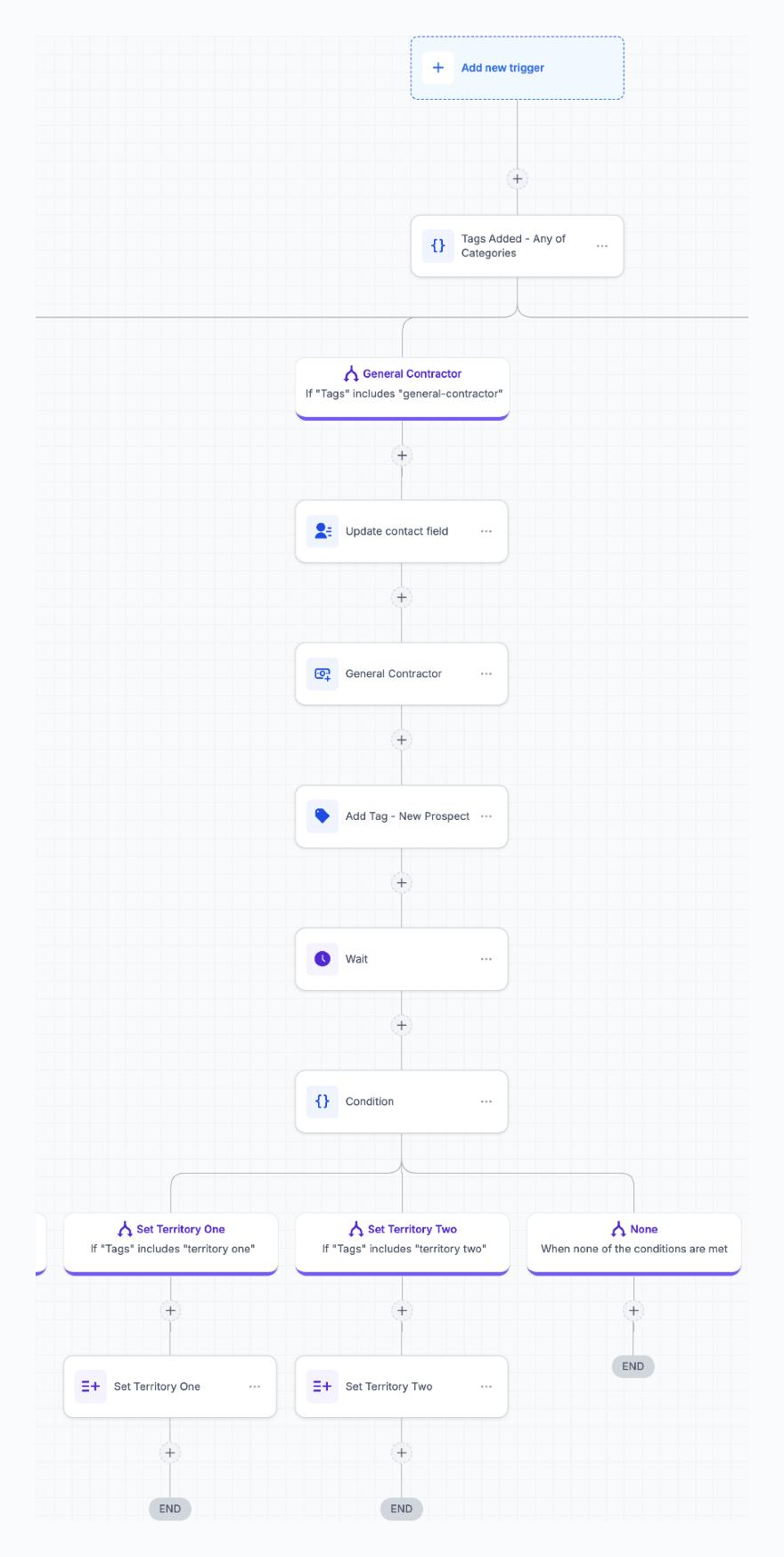
Lead Categorization, Pipeline Routing & Territory Assignment

The problem

A restoration company was building a network of referral partners: real estate agents, contractors, inspectors, insurance agents and others. Each type of partner needed its own pipeline and records. Many restoration companies also cover two separate service areas in the same state, so every lead had to go to the right location’s team. Sorting hundreds of leads by profession and area by hand was slow and often wrong.

What I built

  • Started from a tag: as soon as a lead gets a category tag, this workflow sorts it.
  • Routing by category: branches for about 11 types of professional:

    Real Estate Agent, General Contractor, Property Manager, Home Inspector, Insurance Agent, Electrician, Plumber, Facility, Tree Service, Pest Control, and Other Professional.

    The platform limits how many branches one condition can have, so I chained a second condition onto the first condition’s fallback path to cover the extra categories.

  • On each category’s path:
    • Updates a contact field with the category, so lists, filters and reports stay clean
    • Creates an opportunity in that category’s pipeline
    • Adds a “New Prospect” tag so outreach can start
    • Waits briefly, then checks the territory tag
  • Territory routing: for clients with more than one service area, leads tagged Territory One or Territory Two are assigned to that area’s team. Each location only gets the referral partners in its own region. “Other Professional” leads go into the pipeline without a territory.

Notable work

  • Sorts 11+ lead types in one workflow, replacing hand-sorting and separate workflows for each type.
  • Works around branch limits by chaining conditions, which keeps everything in one place and easy to extend.
  • Two levels of routing, by profession and then by territory, so every lead lands in the right pipeline with the right team.
  • Supports clients with more than one location. The same workflow serves restoration companies with one service area or two in the same state, with no duplicate setup.
  • Organized for reporting: a category field, a pipeline for each category and consistent tags make performance easy to track by segment.
Workflow Canvas ArchitectureMulti-Tier Branching & Territory Routing
Lead categorization, pipeline routing and territory assignment workflow diagram showing category tag triggers, chained conditional branching, opportunity creation, wait steps, and territory sub-routing
Scroll to explore the sequence branchesOpen full resolution →
Case study

Event RSVP Management: Confirmations, Tracking & Reminders

The problem

For an in-person event, guests could RSVP several ways: filling in a form, being tagged by the team, or being moved to a stage in the event pipeline. Each answer (Yes, Maybe, or Can’t make it) needed different follow-up. Guest lists had to stay accurate, and confirmed guests needed reminders so they’d actually attend. Doing all of that by hand for every guest wasn’t realistic.

What I built

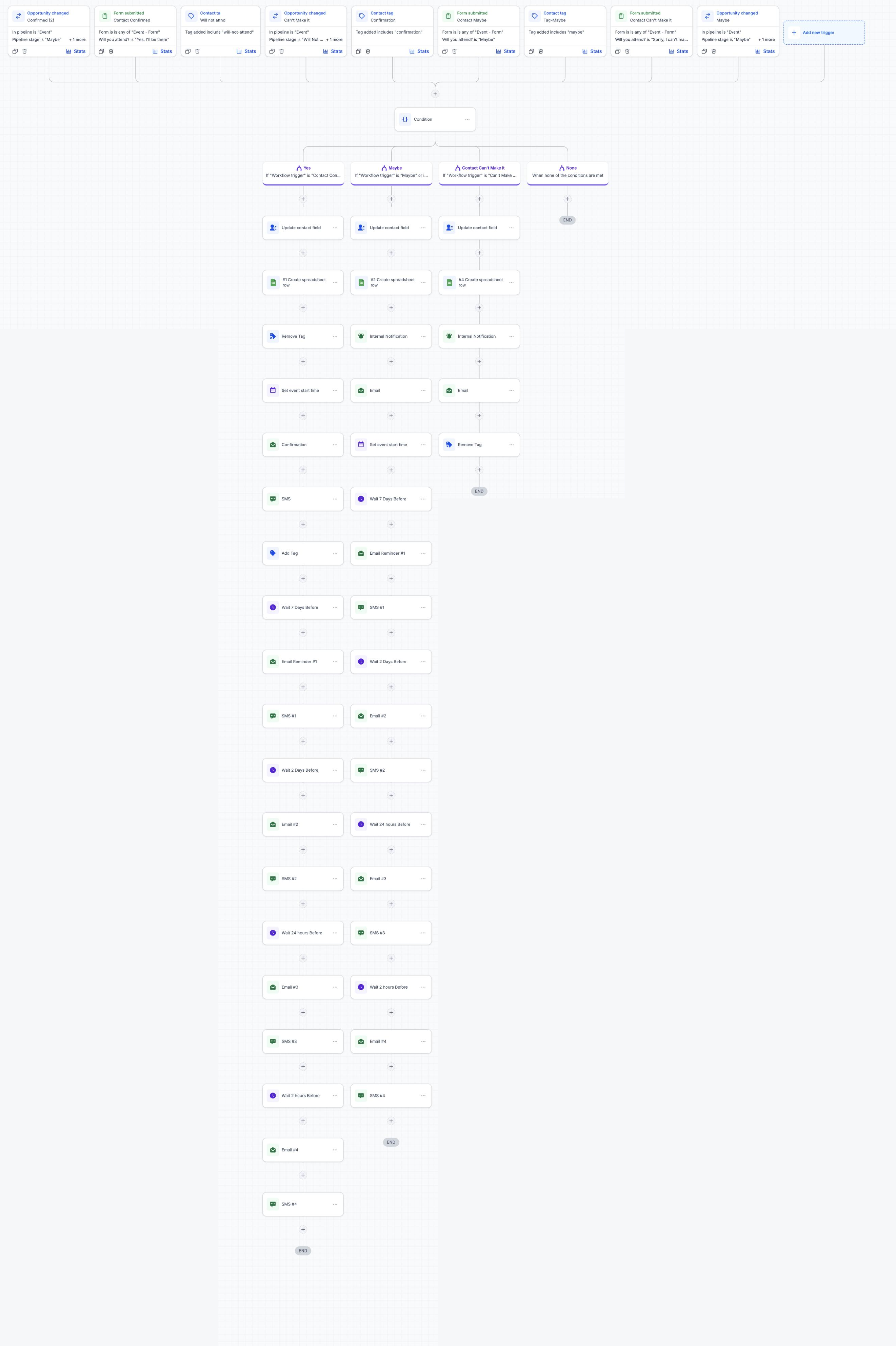
  • 9 triggers, one workflow: every way a guest can RSVP feeds the same automation:
    • An RSVP form (“Will you attend?”: Yes / Maybe / Sorry, I can’t make it)
    • Tags the team can add by hand (confirmation, maybe, will-not-attend)
    • Pipeline stage changes in the Event pipeline (Confirmed, Maybe, Can’t Make It)
  • Routing by answer: a condition reads which trigger fired and sends the guest down the Yes, Maybe or Can’t Make It path.
  • On every path:
    • Updates a contact field with the guest’s RSVP status
    • Adds a row to a Google Sheet, so the event team has a live guest list outside the CRM
  • Yes (confirmed):
    • Removes old RSVP tags, sets the event start time on the contact, and sends a confirmation email and SMS
    • Reminders counted back from the event date: 7 days, 2 days, 24 hours and 2 hours before, each with an email and an SMS
  • Maybe:
    • Sends the team an internal alert and the guest a follow-up email
    • Sets the event time and sends the same 4-step email and SMS reminder schedule, to turn maybes into attendees
  • Can’t make it:
    • Sends the team an internal alert and the guest a polite email, then clears their tags so they get no more reminders

Notable work

  • Keeps every RSVP method in sync. Whether a guest fills in the form, gets tagged or is moved in the pipeline, the result is the same, so no RSVP slips through.
  • Reminders follow the event date, not the RSVP date. Every guest gets them at the right moment, however early or late they replied.
  • Nudges maybes toward a yes. Undecided guests get the full reminder schedule, which helps turnout.
  • A live guest list in Google Sheets, updated automatically, so organizers don’t need CRM access.
  • The team is alerted whenever someone is unsure or can’t attend, so they can follow up personally.

Results: Handled RSVPs, guest-list tracking and reminders for 35 guests without any manual follow-up.

Workflow Canvas ArchitectureMulti-Trigger RSVP Routing & Event Countdown
Event RSVP management workflow diagram showing 9 multi-source triggers, conditional branching for Yes, Maybe, and Can't make it paths, Google Sheets logging, and countdown reminder sequences
Scroll to explore the sequence branchesOpen full resolution →
Case study

•GoHighLevel + n8n · Call Intelligence · AI Transcription & Summarization

Google Ads Call Transcript & Summary

Platform & Connectivity

GoHighLevel + n8n

The problem

The Google Ads team talks with business owners on the phone all day. What was said on each call stayed in the rep’s head or in scattered notes. When someone else picked up the contact, they had no quick way to know what was discussed, what the client cared about or what was promised.

What I built

A two-part call-intelligence pipeline that turns every call into a written summary on the contact record, with no manual work:

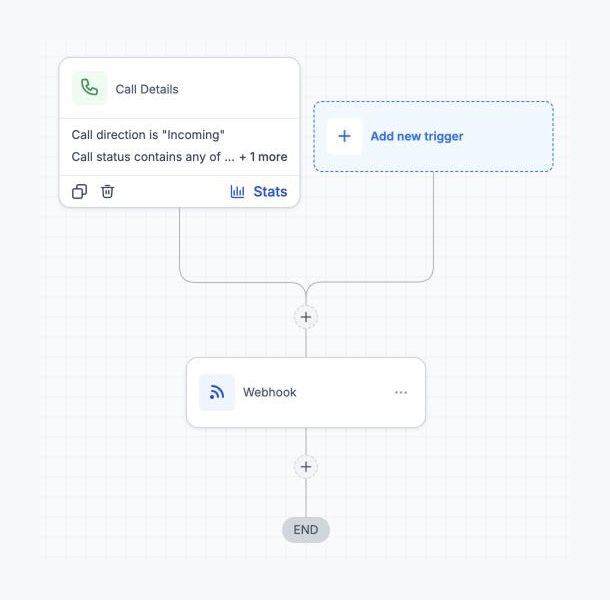
  • Call Transcript: triggers on completed calls (filtered by call direction and status) and sends the call details to n8n by webhook. n8n gets the recording, transcribes it and writes the transcript back to the contact. It then adds a tag that starts the next stage.
  • Call Summarize: triggers on that tag. The CRM’s AI action condenses the transcript into a short summary and saves it to a contact field. After a short wait, a webhook sends the summary to n8n to be posted as a note on the contact, and an internal notification alerts the team. The workflow then removes the tag, waits again and clears the working fields, so the contact is ready for the next call.

Notable work

  • Split into stages linked by a tag, so the slow work (transcription) and the AI summary run independently and are easy to debug.
  • Each run cleans up after itself: the tag is removed and the fields are cleared, so repeat calls to the same contact never mix transcripts.
  • Waits are placed so each step finishes before the next one reads the data.
  • Built once and reused across several client sub-accounts.

Results: Around 24 inbound calls summarized per client account so far. Each one comes with a written summary emailed to the team and saved on the contact, with no one listening back to recordings.

Stage 1: Call Transcript WorkflowCall Details Trigger → Webhook to n8n
Workflow diagram for Stage 1 Call Transcript showing Call Details trigger with Incoming direction and status filter, routing to Webhook node
Scroll to explore the sequence branchesOpen full resolution →
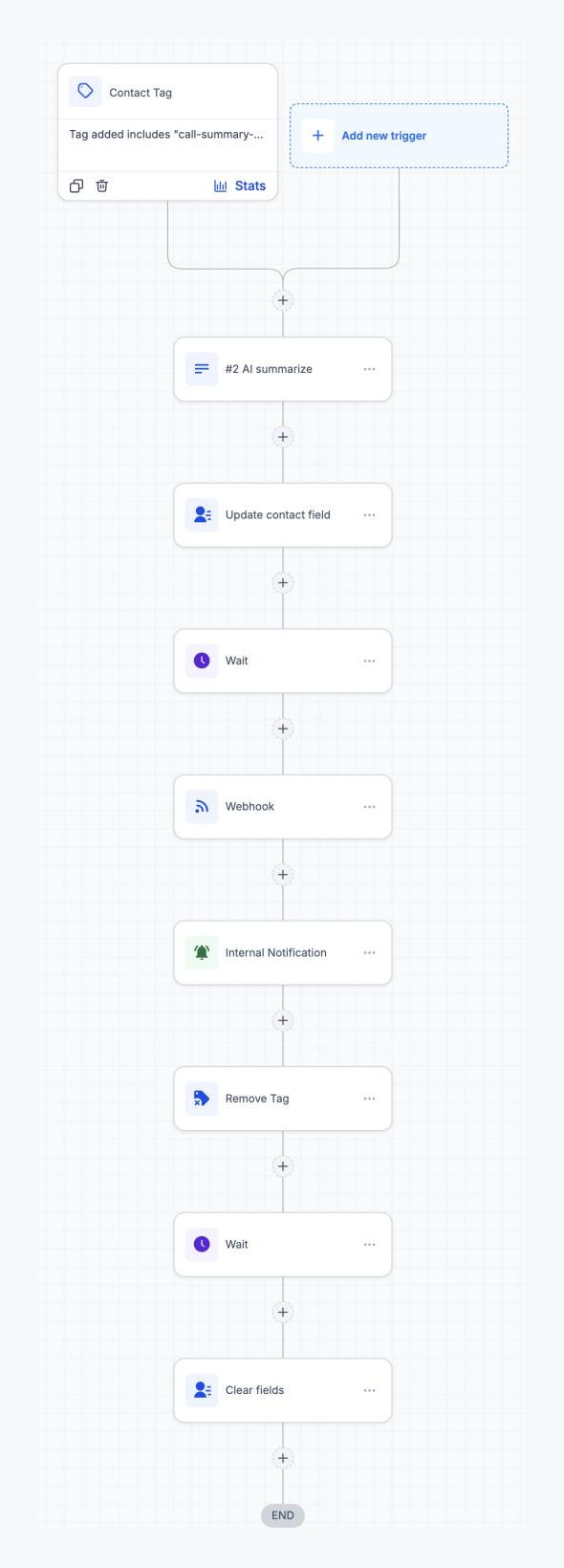
Stage 2: Call Summarize WorkflowTag Trigger → AI Summarize → Field Update → Wait → Webhook → Internal Notification → Cleanup
Workflow diagram for Stage 2 Call Summarize showing Contact Tag trigger, AI Summarize action, Update contact field, Wait, Webhook, Internal Notification, Remove Tag, Wait, and Clear fields
Scroll to explore the sequence branchesOpen full resolution →
GoHighLevel Automation

Sub-Account Onboarding Engine

A provisioning pipeline that spins up GoHighLevel sub-accounts, default funnels, and calendar routing in under ten minutes.

GoHighLevelWorkflowsAPI
GoHighLevel Automation

Funnel Launcher

Templated funnel deployment across sub-accounts with synced forms, pipelines, and trigger links.

GoHighLevelFunnelsAutomations
GoHighLevel Automation

Pipeline & CRM Sync

Two-way sync between GoHighLevel pipelines and external CRMs so sales and ops stay on the same record.

GoHighLevelCRMAPI